How to use Perplexity Computer to find where a business is overspending
How to surface unnecessary spend across bills, contracts, and subscriptions with Computer's help.
Key Things Covered
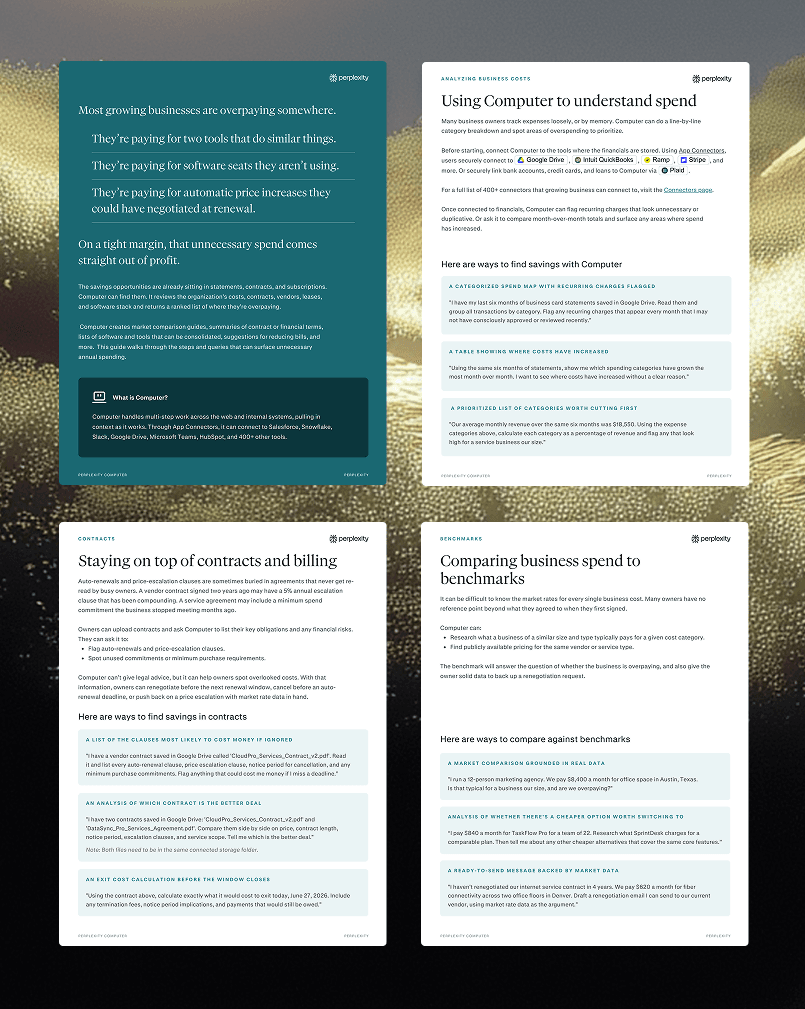
See where the money actually goes
Connect Computer to statements and financial tools, then let it build a line-by-line category breakdown, flag recurring charges nobody approved, and surface the spend categories that have quietly grown month over month.
Catch the costs hiding in contracts
Upload vendor agreements and leases, then have Computer flag auto-renewals, price-escalation clauses, and unused minimum commitments, compare two deals side by side, and calculate the exact cost of exiting before a window closes.
Benchmark every price against the market
Ask Computer what a business of similar size and type typically pays, find publicly available pricing for the same service, and get a ready-to-send renegotiation message backed by real market data.
Cut tool sprawl and repeat the review
Hand Computer a subscription list to organize by cost and function, flag tools that overlap and seats a team will never use, then run the whole audit on a schedule so the savings list stays current.
Summary
Most growing businesses are overpaying somewhere, on duplicate tools, unused seats, and price increases they could have negotiated at renewal, and on a tight margin that unnecessary spend comes straight out of profit.
Perplexity Computer changes that by orchestrating AI agents that do real work end to end, reviewing costs, contracts, vendors, leases, and the software stack, then returning a ranked list of where a business is overpaying with a clear next action for each item. In this guide, owners discover practical ways to plug Computer into every category of spend, turn hours of statement review into minutes, and act on cited, verifiable findings before the next renewal window closes.